If you frequently connect to public Wi-Fi hotspots, it is possible for anyone with the right tools to eavesdrop on your online activity. Perhaps you wish to browse the web without revealing your IP address—which exposes your identity to the world. There’s a solution to all of these potential problems called a virtual private network (VPN). A VPN creates an encrypted tunnel between your connection and a trusted VPN server, so that way when you access the internet, it looks like you’re connecting from a different IP Address. Furthermore, your connection becomes more secure and cannot be easily tracked by malicious hackers.
There are several VPN providers out there. One popular VPN service is called PIA VPN. The best thing about PIA VPN is that it is entirely cross-platform. This means that you have the ability to run it on any operating system you use. PIA also gives you the freedom to connect from several regions, so you don’t have to stick to one particular location.
Would you find aVPN useful? Do you use a different one? Let us know what you think!
I Miss Blink Nation
I’d just like to take a short trip down memory lane for a bit because it’s a bit freezing tonight and there isn’t anything good on Blindy TV at the moment. For the sighted people, you may want to skip this post because the soap box that I’m about to go on won’t make any sense to you guys, just kidding.
I was on Facebook trying to gather all of my blind friends into a nice list where I can easily access them. My list is populated by a bunch of sighted people. While I’m definitely inclusive, at that moment I wished that there were a place just for blind people like there used to be.
VIP: Listening To the Big Picture
This week we join VIP featuring, for the first time, a feedback segment. Join Jessica, Leo and Nelson as they take a look at accessible images for everyone.
When you Tweet photos using the Twitter app for iOS or Android, you have the option to compose a description of the images so the content is accessible to people who are visually impaired.
Automatic alternative text, or automatic alt text, is a new development from Facebook that generates a description of a photo using advancements in object recognition technology. People using screen readers on iOS devices will hear a list of items a photo may contain as they swipe past photos on Facebook. Before today, people using screen readers would only hear the name of the person who shared the photo, followed by the term “photo” when they came upon an image in News Feed. For instance, someone could now hear, “Image may contain three people, smiling, outdoor.”
Cool Picks: APRIL 15, 2016
Join Jessica, Leo and Nelson as they take a look at Cool Picks for everyone.
Cool Picks:
Sing! Karaoke by Smule
iPhone SE
Sony MDR-ZX330BT bluetooth headphones
How To Encrypt the iPhone – Because Privacy Does Matter
In light of Apple’s recent opposition against the FBI’s demands, knowing how to encrypt an iPhone is a valuable skill, and Justin is here to help teach it. He explains what encryption is, how to encrypt the iPhone by setting a passcode, and proceeds to set up Touch ID and take us through the other settings relating to security on the iPhone.
eSight enables people with legal blindness to actually see.
Want to try eSight? Get in touch with their team by calling : 1-855-837-4448
You can fill out the Try eSight form here.
What’s New In iOS 9.3
There have been a lot of new and exciting changes released in this version of iOS. In particular, Apple appears to be focusing on multitasking and ease of use, as they continue to improve apps and provide a more user-friendly experience. Here are just a few features of particular interest:
Four Finger Swipe Multitasking; This is not a new gesture for those using the iPad, but it has finally been introduced to the iPhone.
Night Shift: Changes the display’s brightness and color scheme to a warmer yellowish tone instead of the normal blue after sunset. Sunset is determined by the user’s geolocation and clock settings.
Locked Notes: Ever wanted to protect that precious credit card number you’ve written down on your phone? Well now you can, with your fingerprint and a secure password. Only devices with this technology can view locked notes, so they will appear invisible except when viewed on your iOS 9.3 device or your Mac running the latest version of OsX.
Improvements to Apple Music, News and Health.
Improvements to third party keyboards.
Cool Picks: APRIL 2, 2016
Don’t miss Tamas, Leo and Jessica with their Cool Picks:
Get Your Geek On With #CSUN16 Coverage In the VIP Room
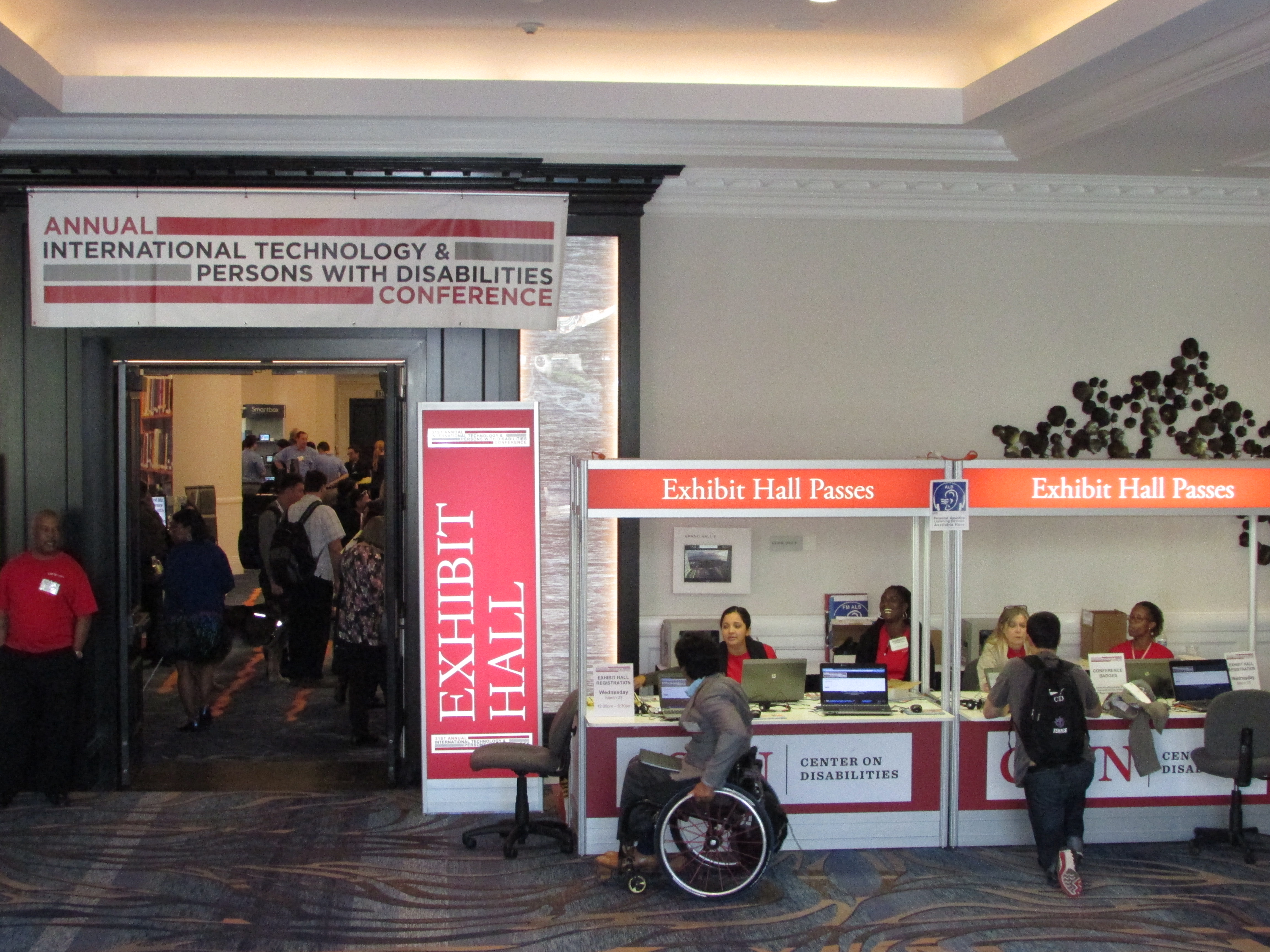
After fighting it out on the #CSUN16 exhibition floor in the Manchester Grand Hyatt Hotel, Joel returns to VIP to share with our listeners on the latest in assistive tech from sunny San Diego.
Don’t miss Tamas, Leo and Jessica with their analyses and of course we can’t forget our Cool Picks.
eSight enables people with legal blindness to actually see.
Want to try eSight? Get in touch with their team by calling : 1 855 837 4448
You can fill out the Try eSight form here.
Cool Picks:
Zomato – Food & Restaurant Finder
CBT Live From #CSUN16: Freedom Scientific Makes Historic Announcements
Eric Damery from Freedom Scientific
talks to us about the mergers and partnerships announced at CSUN with Optelec, American Printing House (APH) and Wells Fargo.
He also gives us details on the new Ruby 7 HD handheld video magnifier and a sneak peek at the exciting new ElBraille, which has everyone who tries it out buzzing.
eSight enables people with legal blindness to actually see.
Want to try eSight? Get in touch with their team by calling : 1 855 837 4448
You can fill out the Try eSight form here.
CBT Live From #CSUN16: Dolphin Computer Access Provides Solutions for All Situations
Gareth Collins talks to us about the wide range of applications available from Dolphin Computer Access and proves that SuperNova is still a great screen reader and magnifier. He also let’s us in on some upcoming apps for iOS and Android that you won’t want to miss.
eSight enables people with legal blindness to actually see.
Want to try eSight? Get in touch with their team by calling : 1 855 837 4448
You can fill out the Try eSight form here.